Why This Odia Typing Course Exists
Every year, tens of thousands of candidates apply for Odisha government typist and junior assistant posts through OSSC, OSSSC, and OPSC. The typing test is a gatekeeper — you must type 30+ WPM in Odia using the InScript layout. Yet most candidates walk in unprepared because there is no structured, free way to learn.
Typing tutors in Bhubaneswar and Cuttack charge ₹2,000–₹5,000 for a few sessions. YouTube playlists are scattered. PDF guides give you theory but no practice. Our course was built to fill that gap: a complete, interactive Odia typing curriculum that works in your browser, tracks your speed in real time, and costs nothing.
The course uses the government-approved InScript keyboard layout, designed by C-DAC and mandated for all Indian language typing in government offices. Every lesson builds on the previous one — you start typing real Odia characters from minute one.
The 29-Lesson Structure (7 Levels)
The course is split into 7 progressive levels. Levels 1–4 are completely free. Levels 5–7 (conjuncts, speed building, exam passages) are available on the Pro plan. Here is what each level covers:
| Level | Lessons | Content | Free? |
|---|---|---|---|
| 1 — Home Row | 1–3 | Basic vowels ଅ ଆ ଇ ଈ ଉ ଊ ଋ ଏ ଐ ଓ ଔ | ✅ |
| 2 — Upper Row & Matras | 4–5 | Vowel signs: ା ି ୁ ୂ େ ୈ ୋ ୌ ୍ | ✅ |
| 3 — Consonants | 6–12 | All consonant vargas: କ–ହ including ୟ ୱ ଳ | ✅ |
| 4 — Combining Marks | 13–14 | Anusvara ଂ, chandrabindu ଁ, visarga ଃ, nukta ଼ | ✅ |
| 5 — Conjuncts | 15–17 | Virama conjuncts, ra-forms, number-row specials | Pro |
| 6 — Speed Building | 18–25 | Words, government vocabulary, numbers, place names | Pro |
| 7 — Exam Passages | 26–29 | Full OSSC-style paragraphs at exam pace | Pro |
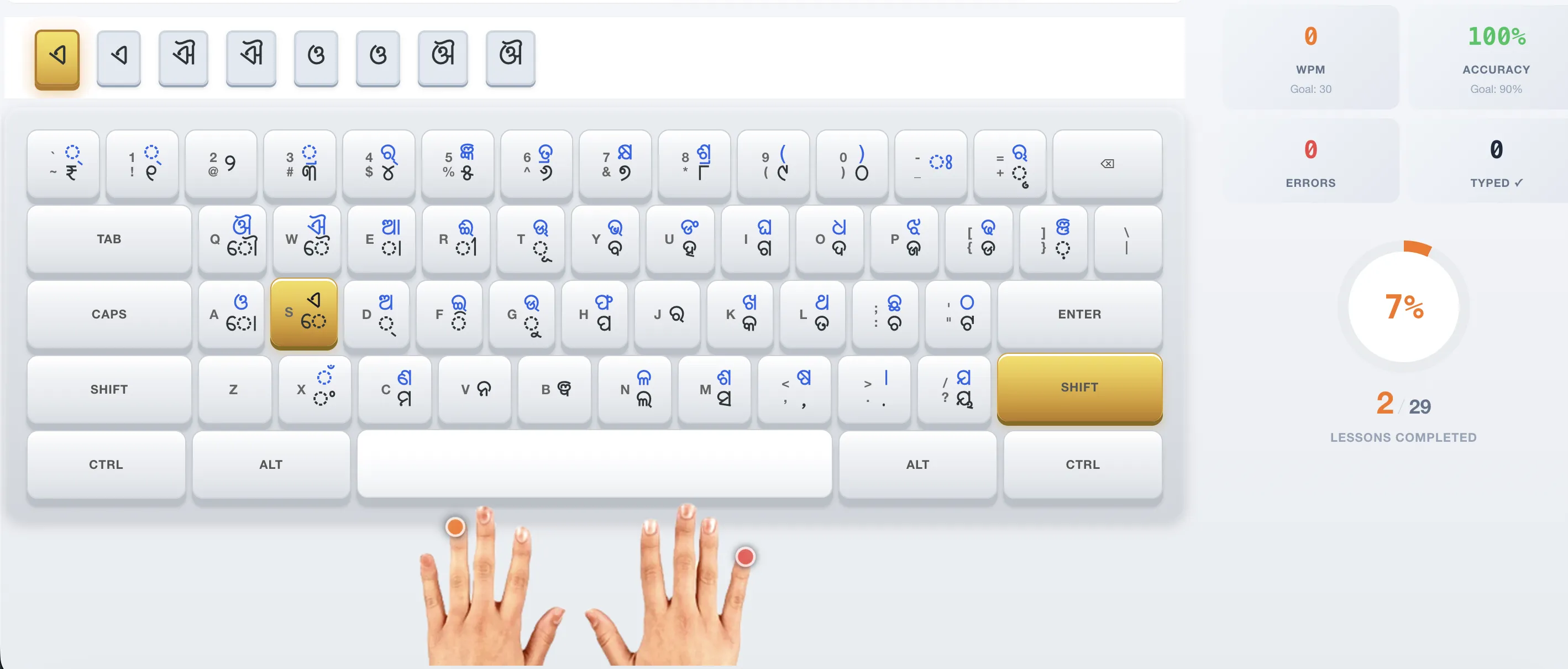
Each lesson runs 3–5 minutes. You type what you see on screen, and the platform highlights your current target character, tracks your WPM in real time, and records your accuracy. When you finish a lesson, you can immediately repeat it or move to the next stage.
💡 Tip: Total free content is about 75 minutes of structured typing practice — more than enough to decide if the InScript layout works for you. Most learners complete the free levels in 1–2 weeks of daily 15-minute practice.
InScript vs Phonetic Keyboards
A common question from beginners is whether to learn InScript or use a phonetic (transliteration) keyboard where you type English and the system converts to Odia. Here is the honest comparison:
| Feature | InScript | Phonetic |
|---|---|---|
| Learning curve | Steeper — you memorise key positions | Gentle — uses English spelling |
| Max speed | 40–60+ WPM achievable | 20–30 WPM ceiling |
| Govt exam acceptance | ✅ Required by OSSC/OSSSC | ❌ Not accepted |
| Muscle memory | Permanent — like touch typing | Fragile — depends on English spelling |
| Offline use | Works with hardware InScript keyboard | Needs software layer |
If your goal is a government typing test, InScript is the only choice. If you just need to type a few Odia words occasionally, a phonetic tool is fine. This course teaches InScript exclusively.
Free vs Pro: What You Get
We believe Odia typing practice should be accessible to every exam candidate. The free tier is substantial — 16 complete lessons covering the entire keyboard. Here is the breakdown:
| Feature | Free | Pro (₹149/mo) |
|---|---|---|
| Interactive typing lessons | 16 lessons (Levels 1–4) | All 29 lessons |
| Real-time WPM & accuracy | ✅ | ✅ |
| Virtual InScript keyboard | ✅ | ✅ |
| Progress dashboard | — | ✅ |
| Document translation (DOCX, PDF) | — | ✅ |
| Unlimited lesson repetitions | ✅ | ✅ |
| Exam simulations | — | ✅ |
The free tier has no time limit, no credit card requirement, and no hidden upsells. It is genuinely free — we make it sustainable through Pro subscriptions that fund development and server costs.
8-Week Study Plan to 30 WPM
Most learners reach 30 WPM in 6–8 weeks with 15–30 minutes of daily practice. Here is a week-by-week plan that follows the lesson structure:
| Week | Focus | Minutes/Day | Target Speed |
|---|---|---|---|
| Week 1 | Vowels (Lessons 1–3) | 10–15 | 5–8 WPM |
| Week 2 | Matras + first consonants (Lessons 4–7) | 15 | 8–12 WPM |
| Week 3 | All consonants (Lessons 8–12) | 15–20 | 12–16 WPM |
| Week 4 | Combining marks + review (Lessons 13–14) | 20 | 14–18 WPM |
| Week 5 | Conjuncts (Lessons 15–17, Pro) | 20–25 | 18–22 WPM |
| Week 6 | Speed words + govt vocab (Lessons 18–22) | 25 | 22–26 WPM |
| Week 7 | Advanced words + numbers (Lessons 23–25) | 25 | 26–30 WPM |
| Week 8 | Exam passages (Lessons 26–29, Pro) | 30 | 30+ WPM |
⚠️ Important: Accuracy matters more than speed in the early weeks. Build the muscle memory first. Speed comes naturally as key positions become automatic.
Typing Tips for Beginners
These tips come from watching hundreds of learners go through the course. They are the difference between plateauing at 15 WPM and breezing past 30 WPM.
Do not look at the physical keyboard
The virtual keyboard display in our course shows exactly which key to press. Train your eyes to watch the screen, not your hands. This builds real touch-typing muscle memory from day one.
Repeat each lesson until you hit 90% accuracy
Do not progress to the next lesson if you are below 90%. Repeating a lesson is not failure — it is deliberate practice. Each repetition reinforces the key positions.
Practice at the same time every day
A 15-minute session every morning builds a habit faster than a 2-hour session on Sunday. Consistency is the single strongest predictor of rapid improvement.
Learn the 5 varga pattern
InScript groups consonants into 5 vargas (କ–ଙ, ଚ–ଞ, ଟ–ଣ, ତ–ନ, ପ–ମ). Each varga shares a logical key zone. Understanding the pattern helps you predict where new characters are, rather than memorising each one in isolation.
Use the shift key deliberately
Every key on InScript produces two characters: unshifted and shifted. The shift character is typically the second character in each varga. For example, key
k= ଖ (shifted) andK= ଘ (shifted+upper row). Practice shift combinations in isolation before mixing them into words.
Start Your First Lesson Now
No signup required. Tt takes 5 minutes to type your first Odia characters.
Start PracticingFrequently Asked Questions
Is the Odia typing course really free?
Yes. 16 of the 29 lessons are completely free — covering vowels, matras, consonants, and combining marks. There is no time limit, no credit card, and no signup required to access free lessons. The Pro plan adds 13 advanced lessons and document translation.
Do I need to install any software?
No. The course runs entirely in your browser. It includes a virtual InScript keyboard display, so you do not even need an InScript keyboard sticker or hardware keyboard. Everything works on Windows, Mac, and Linux.
How long does it take to reach 30 WPM?
With 15–30 minutes of daily practice, most learners reach 30 WPM in 6–8 weeks. The 8-week study plan above shows exactly what to focus on each week. Some learners with prior typing experience reach 30 WPM in as little as 3–4 weeks.
Can I use this course on my phone?
The course is optimised for desktop and tablet browsers. While the typing interface works on phones, we recommend using a physical keyboard with a laptop or desktop for proper touch typing practice.
What is the difference between InScript and Lekha Odia typing?
Lekha Odia typing (lekha.odisha.gov.in) is a browser-based typing tool from the Odisha government. It uses the InScript layout and lets you type documents, but it has no structured lessons, no speed tracking, and no progress monitoring. Our course uses the same InScript layout but adds interactive lessons, real-time WPM tracking, and a progressive curriculum. We recommend Lekha for freeform typing practice and our course for structured skill building.
What typing speed do I need for Odisha government exams?
OSSC requires 30 WPM with 90% accuracy for typist and junior assistant posts. OSSSC requires 30 WPM for Odia and 40 WPM for English. The exam awards 25 marks for correctly typing the passage, with each word counted individually. A score of 10 out of 25 is the minimum qualifying mark.
Can I get a certificate after completing the course?
Yes. Pro users who complete all 29 lessons receive a downloadable certificate of completion showing the total word count typed, average WPM, and accuracy across all lessons. Free users can track their progress within each session but do not receive a certificate.
Ready to Start? Begin Lesson 1 in 5 Minutes
Free Odia typing lessons — vowels, consonants, matras, and more. No account needed.
Start Free Lessons