
Free Odia Typing Course — Learn & Master InScript Keyboard Online
The only Odia typing platform that replicates the exact OSSC and OSSSC exam interface. Practice with official InScript keyboard, earn your 30+ WPM, and walk into your exam confident.
Start Typing Free →Why Odisha Students Choose Us
Built specifically for OSSC and OSSSC exam aspirants — not a generic typing tool
Exact Exam Simulation
OSSC Junior Grade Typist and OSSSC Junior Assistant exam replicas. Same interface, same timer, same scoring formula — no surprises on exam day.
Official InScript Keyboard
Government-approved BIS IS 16350 InScript layout. The only keyboard accepted in Odisha government typing exams (OSSC, OSSSC). Phonetic keyboards are not allowed.
Live WPM & Accuracy
Track your words per minute, accuracy percentage, and OSSC score in real time. See exactly where you stand against exam cutoffs.
29 Progressive Lessons
From basic vowels to government circulars. Each lesson builds on the previous one. Designed for absolute beginners to reach exam-ready speed.
Speed Drills
1-minute, 2-minute, and 5-minute rapid typing drills. Build finger memory and muscle speed through repetition.
Official Scoring
OSSC marks formula: (25 ÷ Total Words) × Correct Words. See your exact score out of 25, same as the real exam.
Which Govt Posts Require Odia Typing?
Not all government exams test Odia typing — only specific posts have a dedicated typing speed test
Note: Posts like OSSC CGL, OSSSC RI/ARI/AMIN require Odia language proficiency and basic computer skills — but do not have a dedicated Odia typing speed test.
How It Works
Three steps to exam-ready typing speed
Learn the Keys
Start with basic Odia vowels using our visual InScript keyboard. Each lesson highlights the key to press.
Build Speed
Progress through 29 lessons from single characters to full paragraphs. Practice daily for 30 minutes.
Simulate the Exam
Take timed OSSC and OSSSC mock tests. Get your official score, identify weak areas, and retake until you pass.
Complete Odia Typing Course Curriculum — All 29 Lessons
Every lesson in our free Odia typing course, from beginner vowels to advanced exam passages. Last updated: May 2025.
Students Love Our Interactive Odia Typing Lessons
Learn Odia typing with visual keyboard guides, real-time feedback, and engaging practice exercises
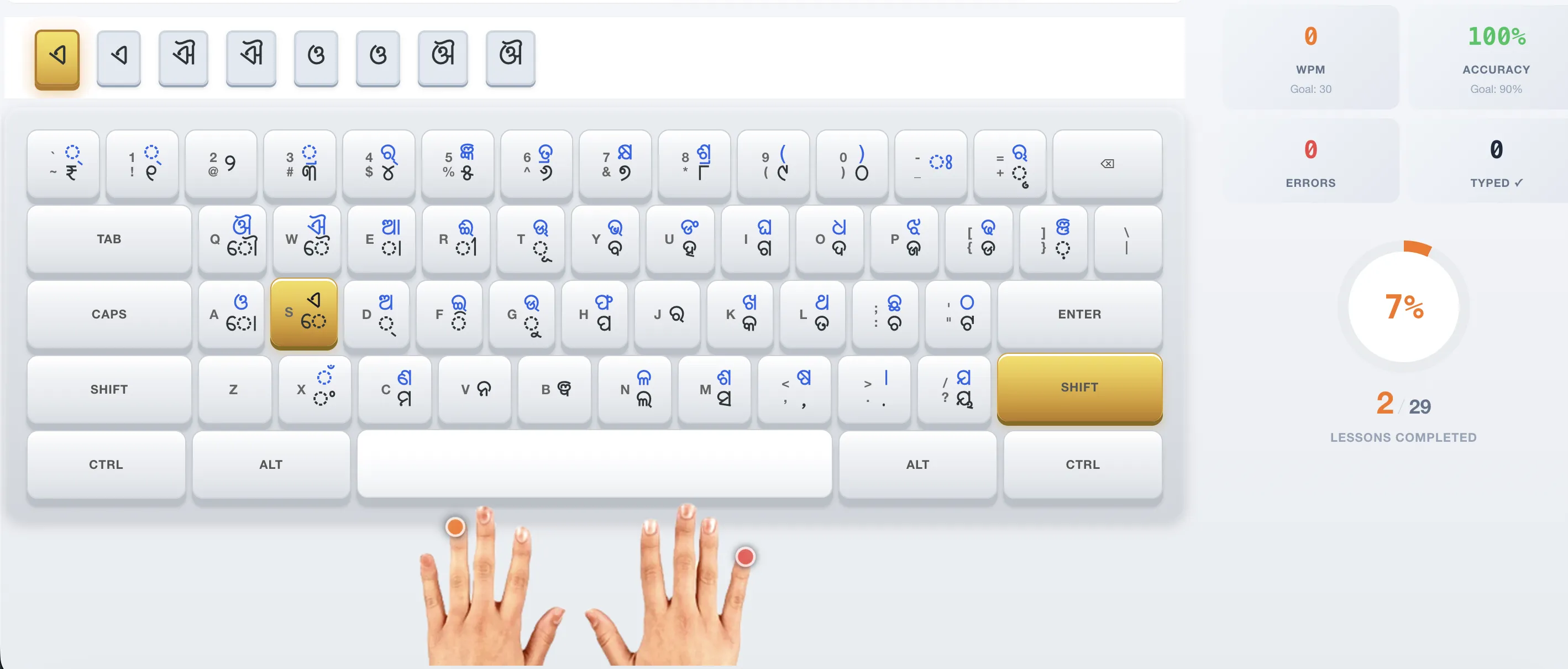
Our Odia typing course combines a visual InScript keyboard with real-time WPM tracking, progress analytics, and a personalized dashboard. Each lesson highlights the exact key to press — making it the easiest way to learn Odia typing from scratch.
What Students Say About Our Odia Typing Course
"The exam simulation helped me understand exactly what to expect. Cleared my OSSC typing test with 22.5/25 in Odia. This Odia typing course was the only resource I used."
Rajesh K.
OSSC Junior Typist Qualified, Bhubaneswar
"I practiced this Odia typing course for 6 weeks. The 29 lessons took me from zero to 18 WPM in Odia. Speed drills were especially helpful in the final week."
Smita P.
OSSSC Junior Assistant, Cuttack
"The exam mode shows no error indicators — just like the real test. When I sat for the actual OSSC exam, the interface felt completely familiar."
Anil D.
Government Typist Exam, Berhampur
Choose Your Plan
Start free. Upgrade when you're ready for advanced exam preparation.
Free
₹0
forever
- ✓ 5 beginner lessons
- ✓ WPM & accuracy tracking
- ✓ Progress saved to account
- ✓ Speed drills
- ✗ Advanced lessons (L5-L29)
- ✗ Exam simulation analytics
Typing Pro — 2 Months
₹100
one-time · 2 months access
- ✓ All 29 typing lessons unlocked
- ✓ Exam simulation analytics
- ✓ WPM & accuracy tracking
- ✓ Speed drills
- ✓ Progress dashboard
- ✓ No auto-renewal
Typing Pro Monthly
₹50
per month · auto-renews
- ✓ Same features as 2-month plan
- ✓ Cancel anytime
- ✓ No long-term commitment
Why Choose Our Free Odia Typing Course
Everything you need to go from beginner to exam-ready in one place
Structured Odia Typing Course for Beginners
Our Odia typing course follows a proven step-by-step curriculum. Start with basic vowels and progress through consonants, matras, conjuncts, and full paragraphs. Each lesson builds on the previous one — perfect for absolute beginners.
Official InScript Keyboard Layout
Odisha government typing exams (OSSC Junior Typist, OSSSC Junior Assistant) require the InScript keyboard. Our Odia typing course teaches you the exact layout used in these exams. See the full Odia keyboard layout →
Track Your Typing Progress
Monitor your words per minute (WPM), accuracy percentage, and lesson completion. Our Odia typing course dashboard shows your exact readiness for the OSSC typing test.
Exam Simulation Included
Once you complete the Odia typing course lessons, test yourself with our exact OSSC and OSSSC exam replicas. Same timer, same scoring formula, same interface — no surprises on exam day. Try OSSC mock test →
Frequently Asked Questions About Our Odia Typing Course
Is this Odia typing course really free?
Yes! Our Odia typing course offers 5 free lessons covering vowels and basic consonants. You can practice unlimited times without paying anything. The Pro plan unlocks the full 30-lesson curriculum with advanced lessons covering matras, conjuncts, and exam passages.
How long does it take to complete the Odia typing course?
With daily practice of 30 minutes, most learners complete all 29 lessons of our Odia typing course in 6-8 weeks. You can reach exam-ready speed (16+ WPM) within the first 3-4 weeks of regular practice.
Which keyboard layout does this Odia typing course use?
Our Odia typing course exclusively teaches the InScript keyboard layout — the government-approved BIS IS 16350 standard. This is the only layout permitted in Odisha government typing tests conducted by OSSC and OSSSC.
Can I learn Odia typing online without installing anything?
Absolutely. Our Odia typing course runs entirely in your web browser. The virtual InScript keyboard shows you exactly which keys to press. No downloads or installations required to start learning Odia typing.
What WPM do I need for Odisha government typing exams?
The OSSC Junior Grade Typist exam requires 16 WPM in Odia and 37 WPM in English. Our Odia typing course targets 30+ WPM to give you a comfortable margin above the minimum requirement.
Start Your Typing Practice Today
Join thousands of Odisha students preparing for their government typing exams. Free to start, no registration required for your first lesson.
Begin Free Practice →