
Odia InScript Keyboard Layout
Complete guide to the official government-approved BIS IS 16350 keyboard for Odia typing, with the full chart of every key mapping.
Why InScript is Required for Odisha Govt Exams
The Odia InScript keyboard is the official Government of India standard (BIS IS 16350) for typing Odia. It is the only keyboard layout permitted in Odisha government typing tests, including OSSC Junior Grade Typist and OSSSC Junior Assistant exams. Our Odia typing course teaches you this exact layout.
How to Install Odia InScript Keyboard on Your Computer
Follow our step-by-step guides to install the Odia InScript keyboard on your operating system. The installation takes less than 5 minutes and requires no third-party software on Windows.
Vowels — ସ୍ୱର
Independent Vowels (Shift required)
Vowel Signs / Matras (No shift)
Consonants — ବ୍ୟଞ୍ଜନ
The five varga groups plus semi-vowels. Lowercase = unaspirated, Uppercase (Shift) = aspirated.
Special Characters & Conjuncts
Marks & Symbols
Number Row Conjuncts (Shift)
Odia Numerals — ସଂଖ୍ୟା
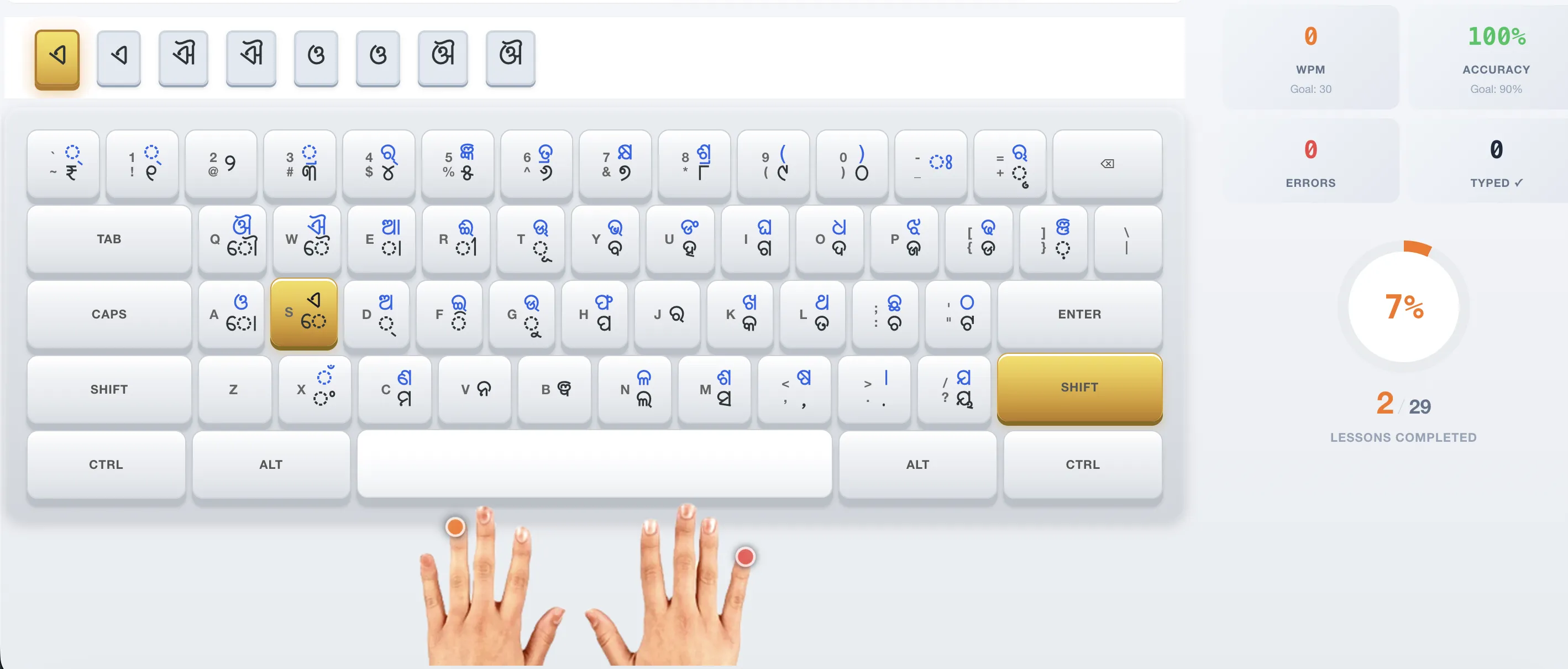
See the Odia InScript Keyboard in Action
Practice Odia typing with our interactive on-screen keyboard that highlights every key
Ready to Practice?
Apply this layout with our free Odia typing course featuring 29 interactive lessons.