Two Tools, One Goal: Passing Your Odisha Govt Typing Exam
If you are preparing for an OSSC or OSSSC typing exam in Odisha, you have likely come across two resources: the official Lekha Odia portal at lekha.odisha.gov.in and the free practice tool at OdiaTyping.co.in. While both help you prepare for the same government typing assessments, they serve very different purposes.
Understanding the difference between these two platforms — and when to use each — can save you time, frustration, and help you prepare more effectively for your typing exam.
What the Official Lekha Odisha Portal Offers
The official Lekha Odisha portal (lekha.odisha.gov.in) is the Government of Odisha's platform for administering typing assessments. It handles registration, exam scheduling, and official result declarations. Candidates must register on this portal to book their typing exam slot.
On the official portal, you can register for the Lekha Odia typing programme, view exam schedules, check results, and download certificates. However, the portal offers limited practice functionality — it is primarily an exam administration platform, not a training tool.
The official portal requires you to log in with credentials issued through authorized computer training centres. Direct self-registration may not always be available, which can be frustrating for candidates who just want to start preparing.
What OdiaTyping.co.in Offers for Free
OdiaTyping.co.in is a completely free, independent practice platform designed to help you prepare for Lekha Odia typing assessments. Unlike the official portal, there is no registration, no login, and no waiting — you can start typing practice immediately.
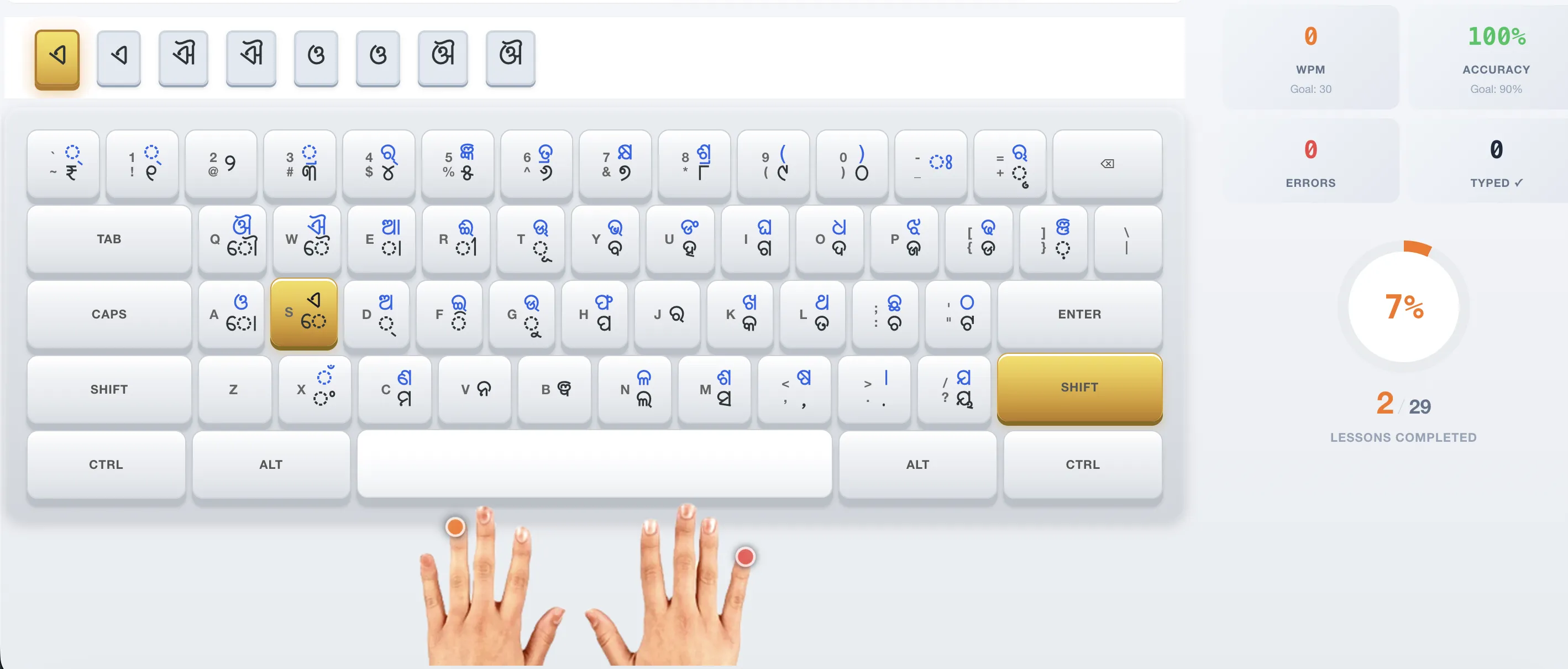
Key features include unlimited timed practice sessions with the official InScript keyboard layout, real-time WPM and accuracy tracking, 29 interactive lessons from beginner to advanced, exam-style Odia passages matching the official exam format, and mock tests that simulate the real OSSC/OSSSC scoring formula.
The platform works entirely in your browser — no downloads, no installations, and no special software required. It also tracks your progress over time with an optional free account, helping you identify weak areas and measure improvement.
How They Complement Each Other
The best preparation strategy uses both platforms together. Use OdiaTyping.co.in for daily practice, skill building, and mock tests. Then use lekha.odisha.gov.in only when you need to register for the official exam, check your schedule, or view results.
Think of OdiaTyping.co.in as your practice ground and the official portal as the exam venue. You train on the practice ground and only visit the venue when it is time to take the actual test. This separation is natural and efficient.
The official portal requires a login and has limited practice features. OdiaTyping.co.in requires no login and offers unlimited practice with the exact same keyboard layout and exam format. They are not competitors — they are complementary tools for different stages of your exam journey.
Which One Should You Use?
Use OdiaTyping.co.in if you want free, unlimited Odia typing practice without any registration hassle. Use it daily to build speed, improve accuracy, and track your progress with real-time WPM feedback.
Use lekha.odisha.gov.in if you need to register for the official Lekha Odia typing assessment, view exam schedules, check your results, or download your typing certificate.
If you are just starting your preparation, begin with OdiaTyping.co.in. Practice daily for 2-4 weeks until you consistently meet the speed requirement for your target post (16 WPM for OSSC Junior Grade Typist, 20 WPM for OSSSC Junior Assistant). Then book your exam through the official portal.
Frequently Asked Questions
Is OdiaTyping.co.in the official Lekha Odia portal?
No. OdiaTyping.co.in is an independent free practice resource. The official Lekha Odia portal is at lekha.odisha.gov.in for registration, exam scheduling, and results.
Do I need to register on the official portal to use OdiaTyping.co.in?
No. OdiaTyping.co.in requires no registration, login, or payment. You can start practicing immediately in your browser.
Which platform should I use for daily practice?
Use OdiaTyping.co.in for daily practice — it offers unlimited timed sessions, WPM tracking, and exam-style passages with the official InScript keyboard layout.
Does the official portal offer practice tests?
The official portal (lekha.odisha.gov.in) is primarily an exam administration platform. It has limited practice features. OdiaTyping.co.in is better suited for comprehensive daily practice.
Can I use both platforms together?
Yes. Use OdiaTyping.co.in for free unlimited practice and the official portal for exam registration and scheduling. They complement each other perfectly.