1. Why Odia Typing Practice Matters for Beginners
If you have never typed in Odia before, you are not alone. Thousands of OSSC and OSSSC exam aspirants start from zero and successfully reach exam-ready speed. The key is structured Odia typing practice for beginners — following a progressive curriculum rather than jumping into complex passages.
The Odia script has 47 basic characters (12 vowels and 35 consonants) plus vowel signs (matras), conjuncts, and special marks. When you learn them in the right order, the InScript keyboard layout becomes logical and easy to remember. Our course is designed to take you through this exact progression.
2. InScript Keyboard Basics for Beginners
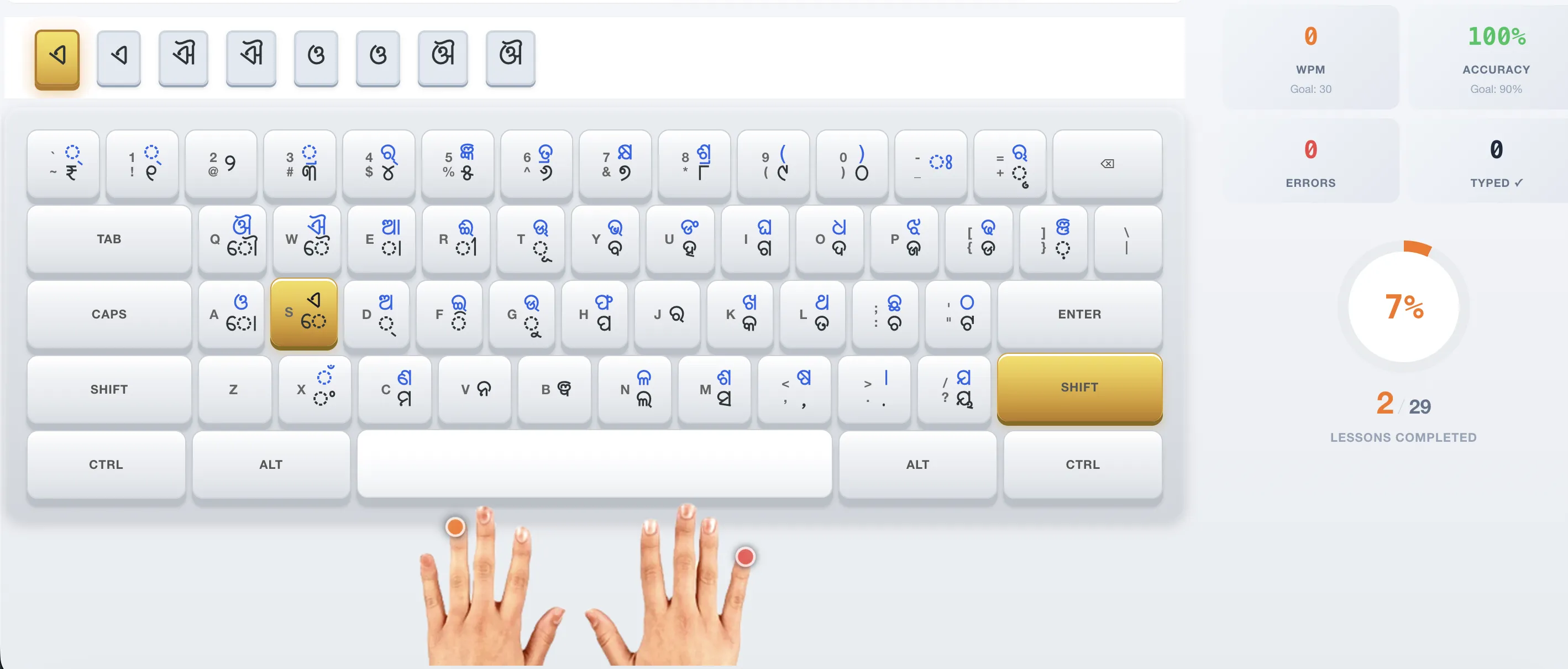
Before starting your Odia typing practice, it helps to understand how the InScript keyboard is organized. Unlike English QWERTY where keys are arranged historically, InScript is designed logically:
| Key Type | How They Work | Examples |
|---|---|---|
| Vowels (Independent) | Press Shift + key to type a full vowel (ଅ ଆ ଇ) | Shift+D = ଅ, Shift+E = ଆ |
| Matras (Vowel Signs) | Press the key without shift to type matras (ା ି ୁ) | e = ା, f = ି, g = ୁ |
| Consonants | Most consonants are on the top row (QWERTY row) | k = କ, h = ପ, l = ତ |
| Shift Consonants | Shift + consonant key = aspirated version | Shift+K = ଖ, Shift+H = ଫ |
For a complete reference, visit our Odia keyboard layout page which shows every key and its corresponding Odia character.
3. Beginner Practice Plan (First 2 Weeks)
Follow this daily practice plan for your first two weeks of Odia typing practice as a beginner:
| Day | Focus | Time |
|---|---|---|
| Day 1 | Learn vowels: ଅ ଆ — the D and E keys | 15 min |
| Day 2 | Vowels: ଇ ଈ — the F and R keys | 15 min |
| Day 3 | Vowels: ଉ ଊ ଋ — the G, T, and = keys | 15 min |
| Day 4 | Review all vowels. Practice typing vowel sequences | 15 min |
| Day 5 | Matras: େ ୈ ୋ ୌ ୍ — the S, W, A, Q, D keys | 15 min |
| Day 6 | Matras: ା ି ୀ ୁ ୂ — the E, F, R, G, T keys | 15 min |
| Day 7 | Review matras. Practice vowel + matra combinations | 20 min |
| Day 8 | Consonants: କ ଖ ଗ ଘ ଙ — the K, K+Shift, I, I+Shift, U+Shift | 20 min |
| Day 9 | Consonants: ଚ ଛ ଜ ଝ ଞ — the ;, ;+Shift, P, P+Shift, ]+Shift | 20 min |
| Day 10 | Consonants: ଟ ଠ ଡ ଢ ଣ — the ', '+Shift, [, [+Shift, C+Shift | 20 min |
| Day 11 | Consonants: ତ ଥ ଦ ଧ ନ — the L, L+Shift, O, O+Shift, V | 20 min |
| Day 12 | Consonants: ପ ଫ ବ ଭ ମ — the H, H+Shift, Y, Y+Shift, C | 20 min |
| Day 13 | Remaining consonants: ଯ ର ଲ ସ — the /+Shift, J, N, M | 20 min |
| Day 14 | Review all characters. Type simple words | 30 min |
This plan follows the exact structure of our free Odia typing course. Each lesson in the course matches a day in this plan, with interactive exercises and real-time WPM tracking.
📝 Start Lesson 1 Now — It Takes 5 Minutes
Jump straight into interactive Odia typing practice. No signup required.
Start Free Practice →4. Printable Practice Exercises
While our interactive course provides the most effective Odia typing practice for beginners, you can also practice with these exercises using any text editor. Copy these lines and type them using the InScript keyboard:
Vowel Practice
ଅ ଅ ଅ ଆ ଆ ଆ ଇ ଇ ଇ ଈ ଈ ଈ
ଉ ଉ ଊ ଊ ଋ ଋ ଋ ଋ
ଅ ଆ ଇ ଈ ଉ ଊ ଋ ଏ ଐ ଓ ଔ
Matra Practice
ା ା ି ି ୁ ୁ ୂ ୂ
େ ୈ ୋ ୌ ୍
କା କି କୁ କେ କୋ
Simple Word Practice
କରି କରି ପାଇ ପାଇ ଯାଇ ଯାଇ
ଆସି ଆସି ଦେଖି ଦେଖି ହୋଇ ହୋଇ
These exercises correspond to the first few lessons in our course. For the full set of 29 progressive lessons with interactive feedback and speed tracking, use the online course.
5. Common Beginner Challenges & Solutions
| Challenge | Solution |
|---|---|
| Forgetting key positions | Use our visual keyboard guide — it highlights the exact key to press for each character. With practice, muscle memory takes over. |
| Confusing similar characters | Characters like ଡ (DDA, key [) and ଦ (DA, key o) look similar. Practice them side by side in our consonant comparison lessons. |
| Shift key confusion | Vowels require Shift + letter key. Matras do not. Our course clearly marks which characters need Shift and shows the correct finger to use. |
| Slow speed despite practice | Speed comes after accuracy. Focus on typing each character correctly before trying to type faster. Use our speed drills once you reach 90%+ accuracy. |
6. Next Steps — From Beginner to Exam-Ready
After completing your first 2 weeks of Odia typing practice, the next steps are:
Complete All 29 Lessons
Progress through our full course covering vowels, consonants, matras, conjuncts, words, sentences, and exam passages. Each lesson builds on the previous one.
Practice Speed Drills
Use our 1, 2, and 5-minute speed drills to build finger speed on common Odia words. Track your WPM progress over time.
Take Full Mock Exams
When you reach 15+ WPM, start taking full-length OSSC mock exams. Our simulator uses the exact exam interface with the official 25-word scoring formula.
🌟 Start Your Odia Typing Journey Today
Free interactive course with 29 lessons, real-time WPM tracking, and OSSC exam simulation. No signup required.
Start Free Course →